Christmas Deer in Winter Background: A Practical Guide for Designers and Creators
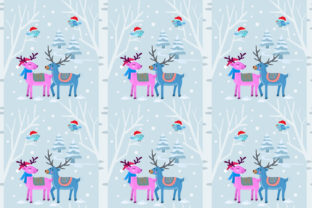
A Christmas Deer in Winter Background is a high-resolution, seamless pattern featuring stylized or realistic deer motifs set against a wintry landscape—think frosted pine boughs, soft snowfall, muted evergreens, and cool-toned skies. Unlike standalone illustrations or holiday-themed stock photos, this design is engineered as a repeatable tile: each edge aligns precisely with its opposite, enabling infinite tiling without visible seams. That technical detail matters—it’s what makes the pattern viable across scales and surfaces, from narrow ribbon prints to full-wall murals.
What Sets This Pattern Apart From Other Holiday Designs
Most seasonal graphics fall into two broad categories: photographic scenes and isolated vector elements. A photographic winter scene may evoke mood but rarely tiles cleanly—and scaling it up often reveals pixelation or compression artifacts. Isolated vector deer icons offer flexibility but require manual layout, spacing, and background integration, adding time and design overhead. The Christmas Deer in Winter Background bridges that gap. Its seamless construction means it works “out of the box” for repeat-based applications, while its 5000 × 5000 px JPEG resolution ensures clarity even when printed at large scale (e.g., 6-foot-wide backdrops), and the EPS 8 vector file preserves editability in professional vector editors like Adobe Illustrator or Affinity Designer.
This dual-format delivery isn’t universal. Many holiday patterns ship only as low-res PNGs or non-scalable raster files—fine for social media posts, less so for textile production or commercial signage. Others provide vectors but lack sufficient detail or stylistic cohesion to hold up across fabric weaves or wallpaper substrates. The Christmas Deer in Winter Background avoids those pitfalls by balancing resolution, scalability, and intentional visual rhythm.
Where It Excels—And Where It Has Limits
The strength of this pattern lies in consistency and context. Because the deer and winter elements are integrated into a unified composition—not layered over a generic texture—the result feels cohesive and intentional. That makes it especially effective for:
- Fabrics and textiles: When printed on cotton, linen, or polyester blends, the balanced density of deer figures and negative space prevents visual clutter, even on upholstery or quilt backing.
- Gift wrapping and stationery: The seamless nature allows for custom-printed rolls or sheets without awkward breaks at fold lines.
- Wallpaper and wall murals: At 5000 px, it supports standard wallpaper repeat heights (e.g., 27" or 36") with room to spare for trimming and alignment.
- Digital backdrops and virtual event backgrounds: Clean edges and neutral contrast make it compatible with chroma-key workflows and video conferencing platforms.
That said, it’s not universally optimal. If your project demands heavy customization—like swapping out deer for reindeer, changing snow to rain, or adjusting color temperature to match a specific brand palette—the EPS file gives you editing capability, but only if you’re comfortable manipulating vector paths and gradients. Beginners may find more value in editable PSD templates with layer groups and smart objects, which this package doesn’t include. Likewise, if your use case requires animation (e.g., falling snow or subtle movement), a static pattern won’t suffice—you’d need motion graphics assets instead.
Comparing Formats: Why JPEG + EPS Matters
The inclusion of both a high-res JPEG and an EPS 8 file reflects thoughtful format planning—not just convenience. The JPEG serves immediate, wide-compatibility needs: uploading to print-on-demand platforms (like Spoonflower or Printful), importing into Canva or Cricut Design Space, or embedding directly into PowerPoint or Keynote presentations. Its 5000 × 5000 px size meets most commercial printing requirements for medium-to-large-scale output without upsampling.
The EPS 8 file, meanwhile, caters to precision work. Unlike newer formats like SVG or PDF/X-4, EPS 8 remains broadly supported across legacy and current versions of professional vector software—including older installations of Illustrator that may not fully render newer PDF standards. It retains editable paths, swatches, and grouping, allowing users to recolor individual deer silhouettes, adjust stroke weights on pine branches, or isolate snowflakes for repurposing. That level of control isn’t possible with raster-only assets—and it’s more stable than AI-native files that sometimes lose fidelity when opened in Affinity Designer.
When to Choose This Over Alternatives
You’ll likely find the Christmas Deer in Winter Background most valuable when your priority is reliability across physical and digital outputs, not rapid iteration or theme variation. For example:
- A small-batch clothing label designing limited-edition holiday scarves benefits from the seamless repeat—no need to manually tile or risk misalignment during fabric printing.
- An event planner sourcing custom backdrop vinyl for a corporate holiday party gains assurance knowing the pattern scales cleanly to 10 feet wide without hiring a designer to rebuild the layout.
- A greeting card publisher evaluating assets for seasonal collections values the dual-format delivery: JPEG for quick mockups, EPS for final press-ready files.
In contrast, if you’re developing a series of themed products—say, coordinating ornaments, mugs, and tote bags—you might prefer a modular asset pack: separate deer silhouettes, snowflake clusters, and branch vectors. That approach offers greater compositional freedom but requires more design time and consistency management. Similarly, if your audience leans toward minimalist or modern aesthetics, a subtler pattern—like single-tone line art deer on off-white—may align better than a richly textured winter scene.
Practical Considerations Before Downloading
Before committing, assess three practical factors:
- Color mode compatibility: The JPEG is RGB—ideal for screen use and many print providers—but if you’re sending files directly to a traditional offset printer, confirm whether they require CMYK conversion. The EPS file can be edited in either mode, but the default may be RGB.
- Scale expectations: While 5000 px is generous, extremely large installations (e.g., 20-foot-wide trade show walls) may benefit from additional interpolation or tiling guidance—not included in the zip, but readily achievable with basic image editing tools.
- Licensing scope: Review usage terms carefully. Most seamless pattern licenses cover commercial use for physical products (e.g., selling deer-printed tea towels), but may restrict resale of the pattern file itself or use in SaaS-based design tools where end users edit the asset.
None of these are limitations unique to the Christmas Deer in Winter Background—they apply broadly to high-quality design resources. But recognizing them early helps avoid mid-project adjustments.
Making the Call: Fit Over Flash
Ultimately, the value of the Christmas Deer in Winter Background isn’t in novelty or trend alignment—it’s in executional reliability. It assumes you already know your medium (fabric? wallpaper? digital display?) and need a solution that integrates smoothly, without requiring rework or compromise. It doesn’t replace conceptual development or brand strategy—but it does remove one variable from the equation: whether your chosen motif will translate faithfully from screen to surface.
If your workflow prioritizes speed, cross-platform compatibility, and consistent visual tone—and you’re working within common holiday design constraints—this pattern delivers tangible utility. If, however, your goals center on experimentation, narrative layering, or highly bespoke illustration, you may find greater flexibility in commissioning original artwork or assembling modular components. Neither choice is superior; they serve different stages of the creative process.
What matters is matching the tool to the task—not the other way around.